
|
August brings fresh energy — and exciting updates — to the Tec4Cloud platform. 🌻
Recent updates to the Tec4Cloud:
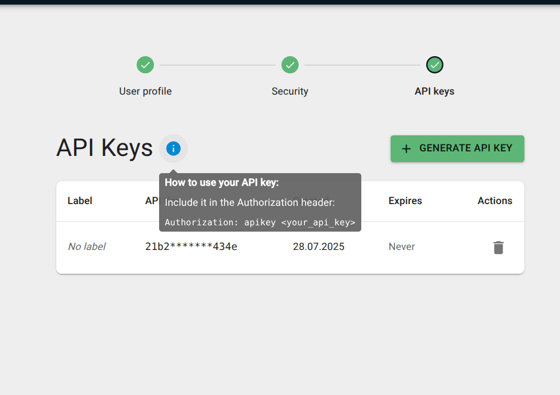
Generate your API KeyUnder your user profile, it's now possible to generate an API key. This key lets you securely access our API without using your username or password.
This feature is ideal for users who integrate our services into their own systems or workflows. |
 |
🔄 Update Reminder: Still in ProgressIn our July newsletter, we introduced several exciting new features that are currently still in development. While these updates have not yet been released, they remain highly relevant and are planned for rollout in the coming weeks. To keep you informed, we’re including them again in this month’s newsletter – so you won’t miss a thing once they go live! Updates coming soon in the Tec4Cloud….
Get ready to experience groundbreaking features soon to be unveiled in our Tec4Cloud platform! |
Shipment View: Set Manual Timestamps and Configure Report & Deeplink OptionsIn the future, you’ll be able to create sub-shipments tailored for specific users. These sub-shipments will allow for:
Targeted reporting for multi-lane shipments, ensuring only relevant information is shared.
The same level of customization will be available when sharing shipment data via deeplinks:
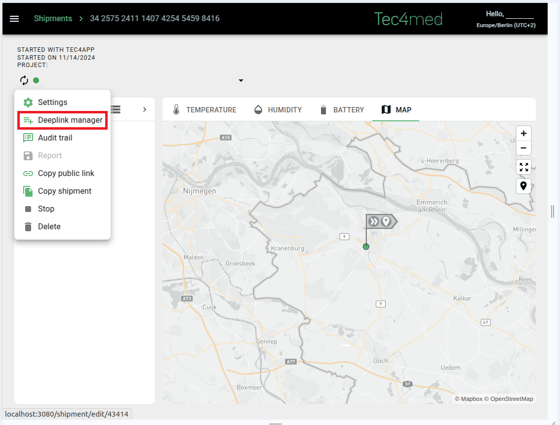
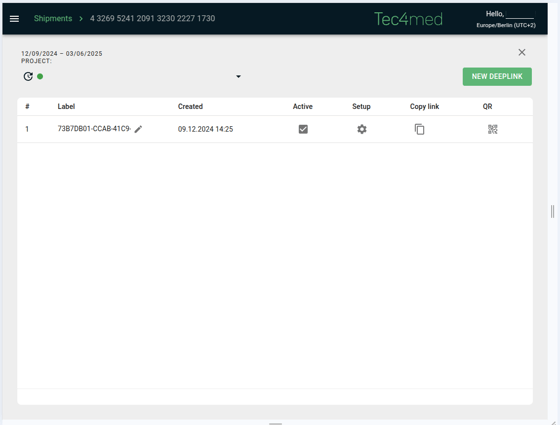
With the new Deeplink Manager in the shipment overview, it’s now possible to view and manage all deeplinks associated with a shipment in one place. This includes adjusting individual settings and accessing a mobile-friendly card view for easier navigation on smaller screens.
These upcoming features are designed to give customers greater control and flexibility when reporting or sharing shipment data. |
 |
 |
|
Enable optional pre-alerts for Shipments/Sites With the introduction of this new feature in Tec4Cloud, you will receive visual notifications on their Site dashboard through distinct alert icons. A yellow triangle icon indicates a pre-alert, while a red triangle denotes a triggered alert. These visual indicators enable immediate recognition of the alert status. Additionally, pre-alert thresholds and conditions can be configured directly within the Project Setup > Alert Settings section. |
|
We hope you now feel well informed by the announcement of these updates. Should you have any further questions, please feel free to contact us at any time at our general help@tec4med.com e-mail address.
We would be pleased to help you.
Kind regards, Your Tec4med-Team
PS: Have you had the opportunity to explore our virtual interactive tutorials on the various Tec4Cloud functions? These comprehensive tutorials provide detailed guidance on creating Shipments, Sites, and Projects, as well as adding new users. We invite you to experience them on our Tec4Cloud tutorial website. |